
Suno's Watermark: What It Is, and How to Get It Off Your Tracks
Suno has watermarked its output since v3 — your back catalogue is already marked. Here's what the watermark actually is at a technical level, why EQ and re-encoding can't touch it, and what to do before the September 3 export deadline.
Contents9 sections
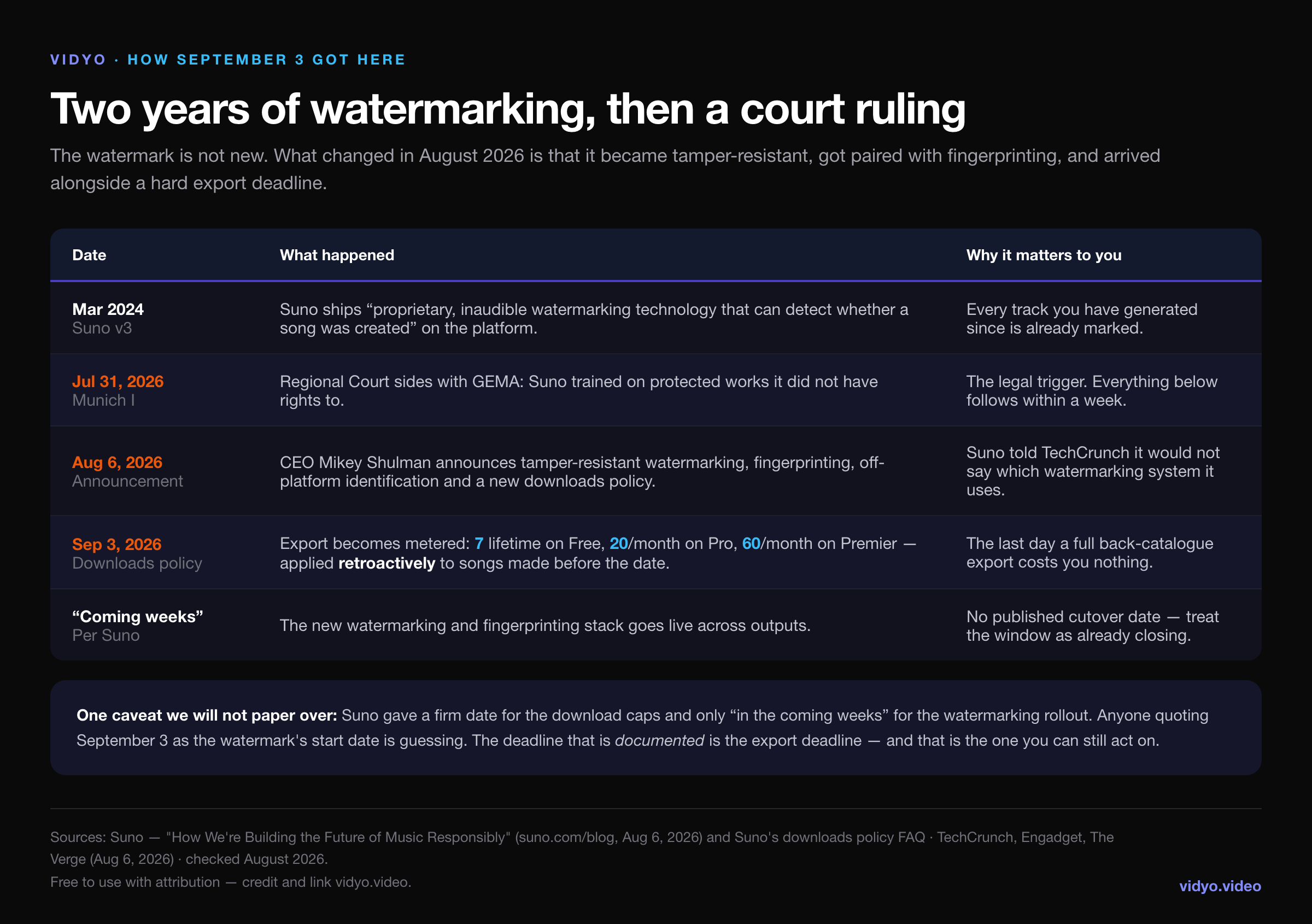
On August 6, 2026, Suno CEO Mikey Shulman announced that the platform would adopt tamper-resistant audio watermarking and fingerprinting, so that tracks generated on Suno can be identified after they are uploaded anywhere else. Six days earlier, a Munich court had ruled against the company in a copyright case brought by GEMA. Four weeks later, on September 3, 2026, Suno's new downloads policy takes effect and exporting your own library stops being free.
Most of the coverage treated those as one story. They are not. The download caps have a published date you can act on. The watermarking rollout has no date at all — Suno said only "in the coming weeks," and when TechCrunch asked which watermarking system it uses, the company declined to say.
And underneath both is the detail almost nobody has led with: Suno has been watermarking its output since v3 in March 2024. If you have a back catalogue sitting in your library right now, it is already marked. The August announcement does not start the watermarking era — it hardens it, and pairs it with fingerprinting that identifies your specific track off-platform.
This article covers what the watermark actually is at a technical level, why every removal trick circulating on YouTube fails against it, where it genuinely costs you money, and what to do in the days you have left before the export counter starts.
What Suno's watermark actually is
The single most expensive misconception in AI music right now is that a watermark is a sound — a high-frequency tone parked at 19kHz that you can notch out with a filter. That model is wrong, and acting on it wastes hours.
Suno's identification is layered, and the layers are detected by different means:
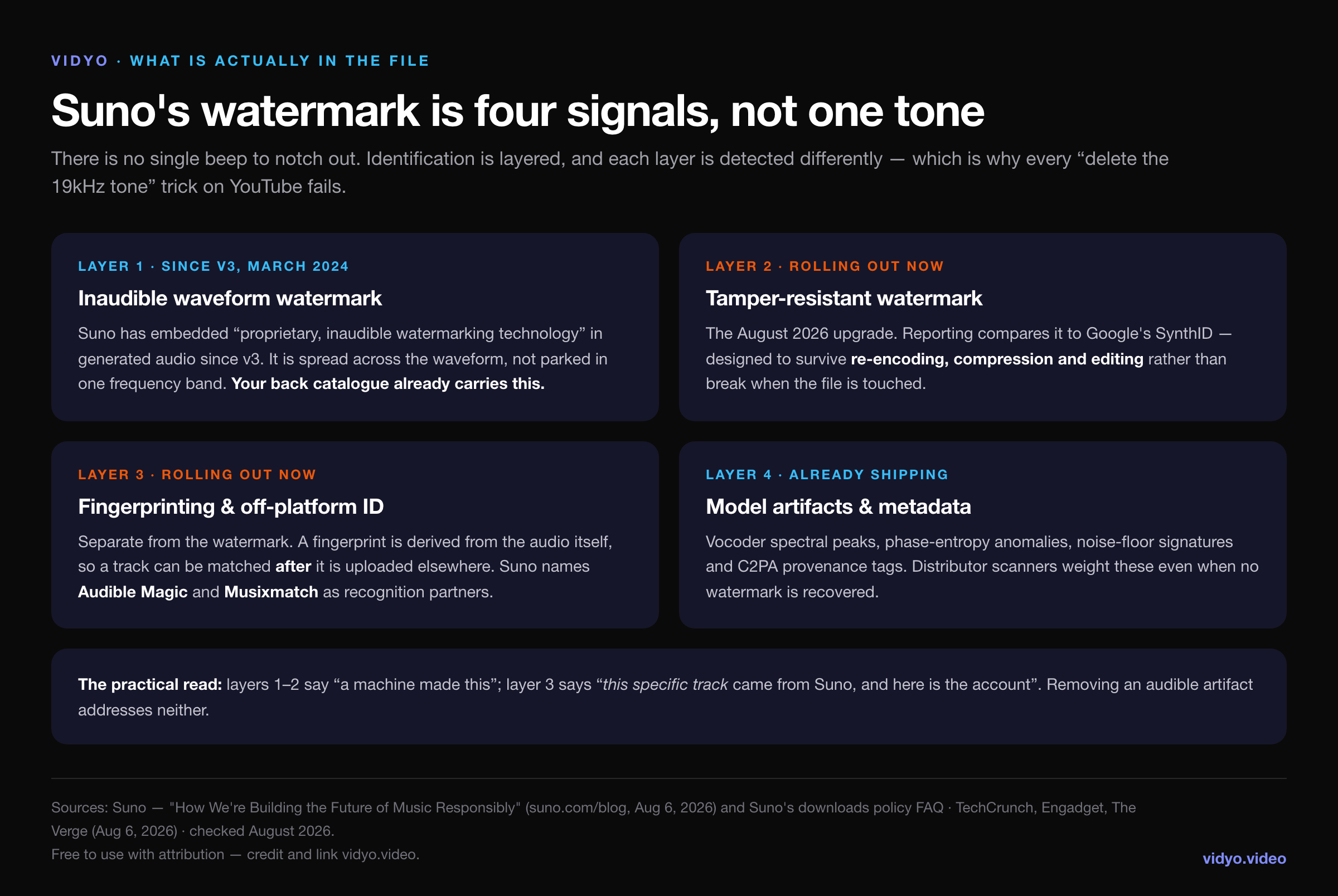
The first layer has been shipping for over two years. Suno's own v3 announcement described "proprietary, inaudible watermarking technology that can detect whether a song was created" on the platform. Inaudible is doing real work in that sentence: the mark is distributed across the waveform as statistical structure — phase relationships, sub-threshold noise patterns, timing micro-variations — rather than sitting in one band where a filter could reach it.
The second layer is the August 2026 upgrade. Reporting has compared it to Google's SynthID, which is designed so that the mark survives re-encoding, compression and editing rather than breaking the moment the file is touched. Suno has not confirmed whether it licensed SynthID or built its own, so treat the comparison as directional.
The third layer is the one artists consistently underestimate, because it is not a watermark at all. A fingerprint is derived from the audio itself — the same principle Shazam runs on. Nothing is embedded, so there is nothing to strip. Suno has named Audible Magic and Musixmatch as content-recognition partners, and Audible Magic is not some obscure vendor: it is already wired into the ingestion pipelines of major distributors and platforms.
The fourth layer is simply what the model leaves behind — vocoder spectral peaks, phase-entropy anomalies, characteristic noise-floor signatures, and C2PA provenance tags in the file container. Screening systems weight these heavily even when no watermark is recovered at all.
Your back catalogue is already marked
This is the part that changes what you should do this week rather than next year.
A lot of artists read the August announcement as a line in the sand: tracks made after the rollout will be watermarked, tracks made before it are clean, therefore the safe move is to generate as much as possible now. That reading is wrong, and it is expensive because it sends people generating instead of exporting.
Suno has watermarked generated audio since v3. Every track in a library built over the last two years already carries layer one, and every one of them carries layer four, which was never optional. The August upgrade does not retroactively bless the old catalogue — it means new output gets a harder mark and a fingerprint alongside it.
So the honest version is: there is no clean-catalogue window to race toward. What there is, is an export window — and that one is real, dated, and closing.
Why the removal tricks do not work
Search "remove Suno watermark" and you will find the same handful of suggestions, all of which share one flaw: they operate on what a listener perceives, and the identifying signal is not something a listener perceives.
- Notch out the high frequencies. There is no single tone to notch. You will lose air off the top of your mix and the mark will still be there, because it was never confined to that band.
- Re-encode as MP3, or bounce through a different format. Layer two is explicitly built to survive compression. Layer three does not care about your container at all — a fingerprint is recomputed from the audio, so re-encoding is exactly the condition it was designed for.
- Add noise, or nudge the pitch and tempo. Modest perturbation is the first thing any serious watermarking scheme is tested against. Push it far enough to matter and you have audibly damaged your own track.
- Re-record it through speakers into a microphone. This does defeat some metadata, and it also degrades your master, adds room noise, and leaves layers three and four intact — the fingerprint survives an air gap for the same reason Shazam works in a noisy bar.
- Rebuild it in a DAW. Genuinely the most effort for the least return, as the numbers below show.
The pattern is consistent. Every one of these is an audio quality operation being asked to do an audio forensics job.
Where the watermark actually costs you money
It is worth being precise about the risk, because the doom-posting is mostly wrong.
The watermark does not delete your tracks. It does not retroactively strip rights from music you generated on a paid tier. Shulman's own framing was that it should be up to artists and platforms to decide whether to communicate that something was made with AI — the mark enables labelling, it does not mandate takedowns.
The place it bites is distributor ingestion. When you submit through DistroKid, TuneCore, CD Baby or anyone else, your file is screened before it reaches a single streaming service. That screening already flags AI-generated audio at the signal level, and Suno's fingerprinting partnership with Audible Magic feeds directly into that same class of system.
A flagged track does not generate a helpful error explaining what to fix. In most cases it simply never goes live — and a track that never goes live never earns anything, no matter how good it is. That failure mode is quiet, which is why so many artists conclude their music just did not find an audience.
Note the asymmetry in the two deadlines here. The export cap arrives on one specific day and then becomes a permanent tax. The screening problem has no deadline at all, because it applies to every submission you will ever make. It is the one that matters for longer.
What actually clears a distributor scan
The useful benchmark here comes from a controlled test published by PopularAiTools: fifty AI-generated tracks, run through five different cleanup approaches, submitted across six distribution platforms and measured on whether they passed ingestion on the first attempt.
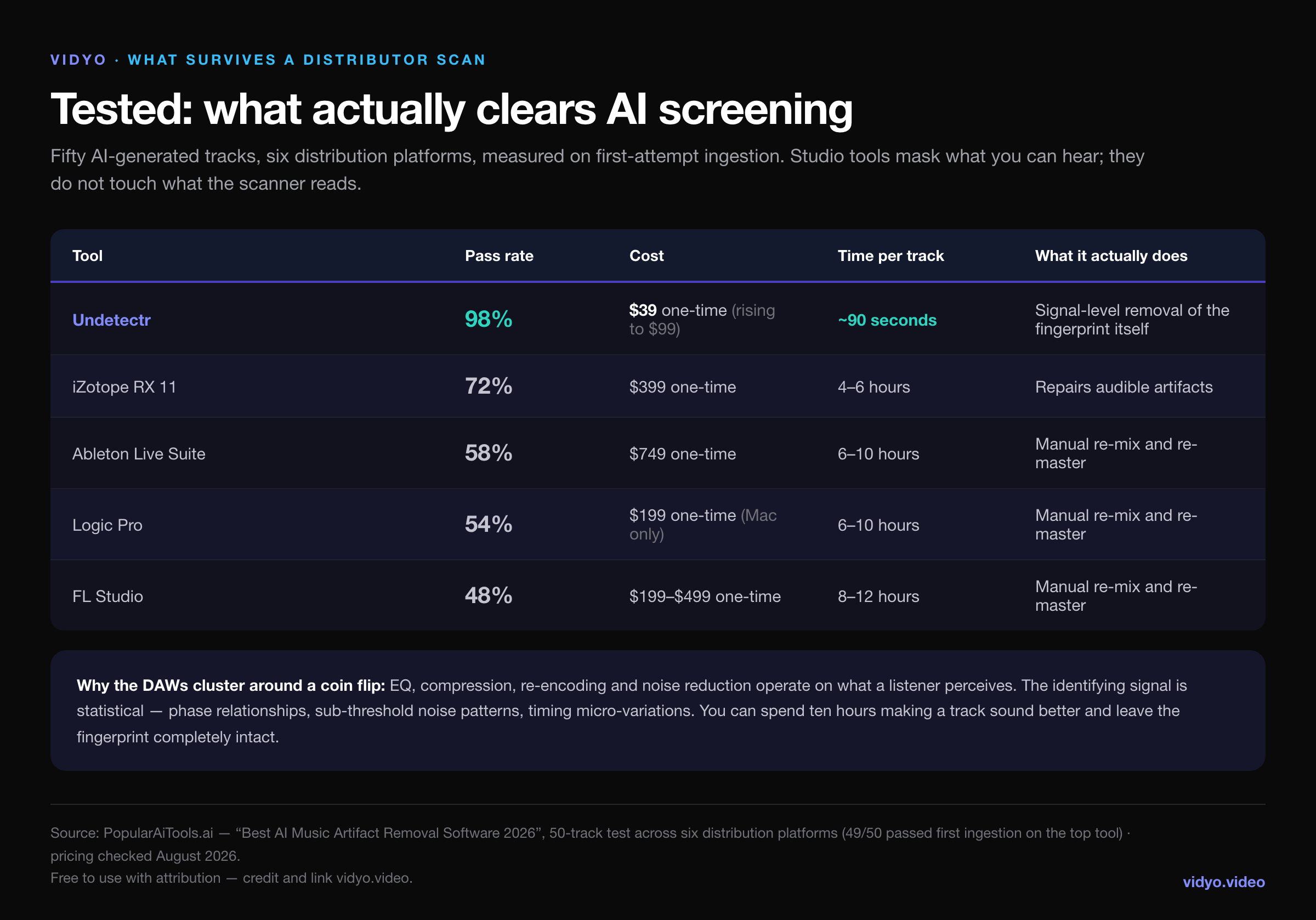
The professional studio tools cluster around a coin flip. iZotope RX 11 — a $399 forensic-grade repair suite — managed 72%. Ableton, Logic and FL Studio, given six to twelve hours of manual re-mixing per track, landed between 48% and 58%. That is not a criticism of those tools. They are excellent at the job they are designed for, which is making audio sound better. Sounding better and reading differently to a scanner are unrelated properties.
Undetectr came in at 98% — 49 of 50 tracks accepted on first submission — at roughly ninety seconds per track. It is the one tool in the set that operates on the identifying signal itself rather than on the parts you can hear, which is why the gap is a step change rather than an incremental improvement. Our own hands-on review rated it 4.75/5 on the same basis.
One caveat worth stating plainly: 98% is not 100%. One track in fifty still needed a second pass. Any tool claiming a perfect rate against an adversarial system that is actively being upgraded is overselling.
Getting your catalogue out before the counter starts
Cleaning is a per-release decision. Exporting is a deadline.
From September 3, Suno meters downloads: 7 for the lifetime of a free account, 20 a month on Pro, 60 a month on Premier, applied retroactively to every song in your library including everything made before that date. We covered the caps and their fine print in detail in our breakdown of the download policy. The arithmetic that matters here is simple: a 400-track back catalogue takes twenty months to export on Pro after the deadline, and costs nothing before it.
Doing that through the Suno interface means opening several hundred tracks and clicking download on each one. Which is exactly the kind of task people intend to do this weekend, every weekend, until the deadline passes.
Undetectr's Suno import tool collapses it into one operation. Make the playlist public, paste its URL, select what you want, and take the whole thing down as a single ZIP of MP3s pulled straight from Suno's CDN. No Suno login is required — it works against any public playlist — and because it runs before September 3, it spends no quota, because there is no quota yet to spend.
Both the bulk export and the artifact removal are included in the same $39 one-time Lifetime plan, alongside MP3, WAV and FLAC output and priority processing. It is a single payment rather than a subscription, and the listed price is scheduled to rise to $99.
The plan, in order
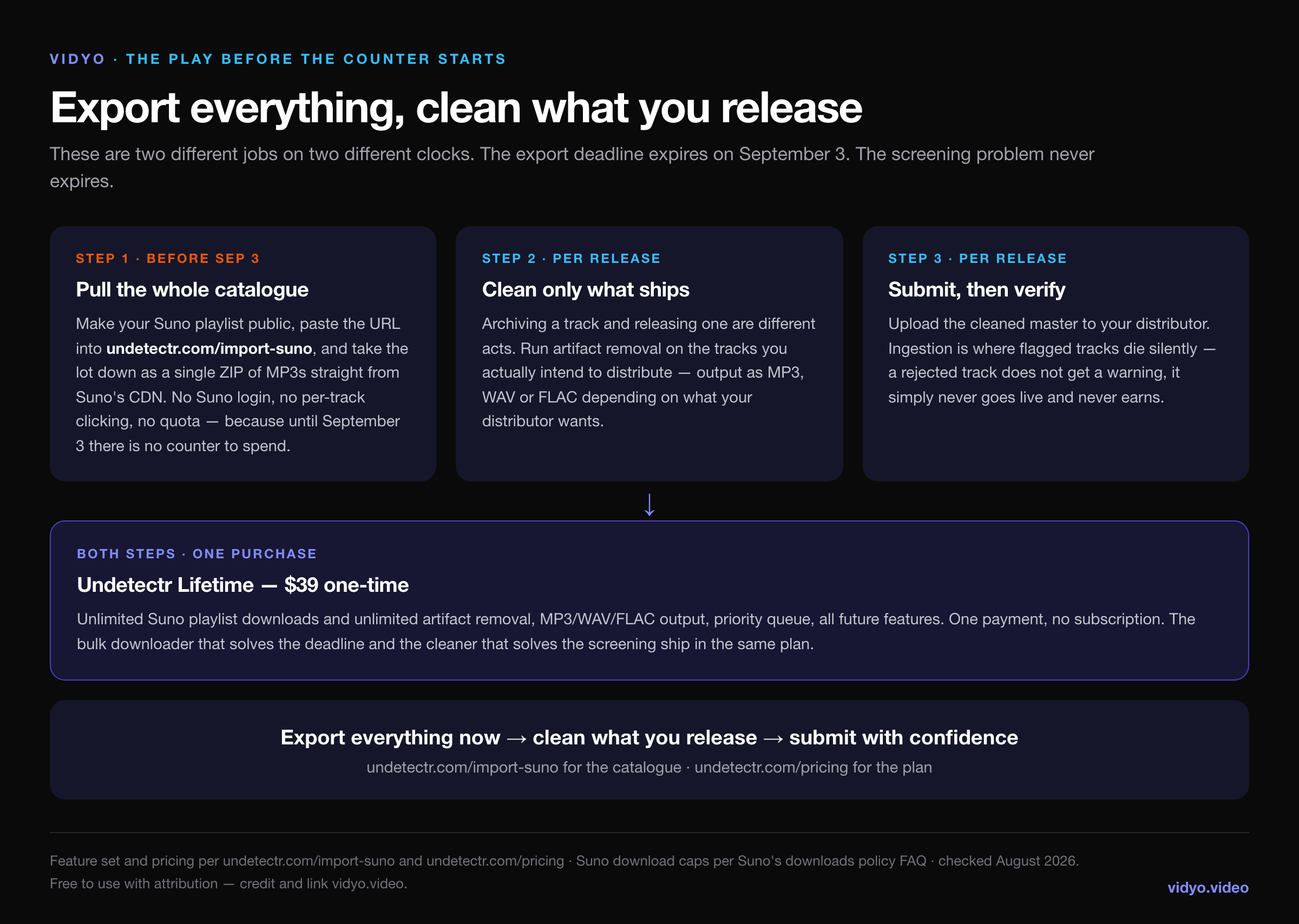
Export the entire library first, and do not filter as you go. Storage is cheap and the counter is not — a track you skip today costs you a download slot to retrieve later. Make the playlist public, run it through undetectr.com/import-suno, and put the ZIP somewhere you back up.
Then, and only then, decide which tracks you are actually releasing — and clean those. Archiving and distributing are different acts with different requirements. The $39 Lifetime plan covers both.
Is removing it allowed?
A fair question, and one that deserves a straight answer rather than a dodge.
On Suno's paid tiers you hold commercial rights to the music you generate — that is the product you are paying for, and Suno's downloads policy update did not change it. Processing audio you own the rights to, before you distribute it, is ordinary post-production. Nobody argues that mastering a track is illegitimate because it changes the file.
What you should not do is treat artifact removal as a licence to do things the rights do not cover. It does not convert a free-tier track — personal use only under the new policy — into a commercial one. It does not launder a track that infringes someone else's work. And Suno's Terms of Service govern your account regardless of what you do to the file afterwards; if you are operating at commercial scale, read them rather than taking a blog's word for it, including ours. This is not legal advice.
The honest summary
Suno's watermark is not new, it is not a tone, and it is not going to delete your music. What is new is that it is getting harder to remove, it is being paired with fingerprinting that identifies your specific track wherever it ends up, and it arrives in the same month that exporting your own library stops being free.
The two problems have very different shapes. The export cap is a hard date with a cheap fix available right up until it lands, and no fix at all afterwards — twenty months of queue for a catalogue you could have pulled down in an afternoon. The screening problem never expires, applies to every release you make from here on, and is the reason a lot of perfectly good AI-assisted music quietly earns nothing.
If you do one thing this week, export everything. It costs nothing today and it is the only part of this that has an expiry date. Cleaning can wait until you know what you are releasing — but the export cannot wait past September 3.
Bulk-export your Suno catalogue · the download caps in full · our Undetectr review